Plan the Year at a Glance: Free Annual Timeline Template for PowerPoint
This blog is reader-supported. When you purchase something through an affiliate link on this site, I may earn some coffee money. Thanks! Learn more.
If you’ve ever sat down to plan the year ahead and thought, “Where do I even start?” you’re not alone. Annual planning can feel overwhelming, especially when you’re balancing long-term strategy with day-to-day delivery.
Whether you’re in a PMO, or working as a project manager on a longer-term project and trying to get a sense of what the next 12 months will bring, sometimes we need that bigger picture view.
Perhaps you’re preparing an annual strategic planning deck for execs or mapping out team-level initiatives across a portfolio. Having a clear timeline makes it easier to tell the story of what’s happening, when, and why it matters. And that makes it easier to get team and stakeholder buy in for your plans.
That’s where this Annual Planning Timeline PowerPoint template comes in. It’s simple, visual, and easy to edit, and it might just become your new favourite planning tool.
Download the free Annual Planning Timeline Template
Why use a timeline for annual planning?
A one year plan on a spreadsheet can quickly turn into cluttered, scrolling monster. And if your stakeholders are anything like mine, they’ll ask for frequent updates or tweaks, so you definitely need to make something that is easy to maintain.
A timeline lets you:
- Visualize the big picture: Group initiatives by quarter and spot overlaps.
- Align team members and stakeholders: Everyone sees the same roadmap.
- Communicate clearly: Especially useful for exec summaries or board presentations.
- Make trade-offs visible: If everything’s Q1, something’s got to give (but let’s not push it all until December either, right?)
Plus, a Plan on a Page is often easier to update and maintain than Gantt charts or resource plans — they’re high-level on purpose.
Who is this PowerPoint timeline template for?
This template was made with project management professionals and planners in mind. People like me. And you!
You’ll find it helpful if you:
- Lead a PMO or portfolio of projects and need to show what’s coming up
- Are responsible for departmental planning (e.g. marketing, ops, transformation)
- Create strategy decks, business plans or board papers that show timelines or action plans
- Just want a clean, visual way to track goals across the year
In other words, it’s perfect for anyone who needs to make time-based plans look smart on a slide. And impress the leadership teams!
More free PowerPoint templates
Project status update timeline
Executive timeline update
Project Ganttchart template
Annual project timeline
What’s in the annual planning timeline template?
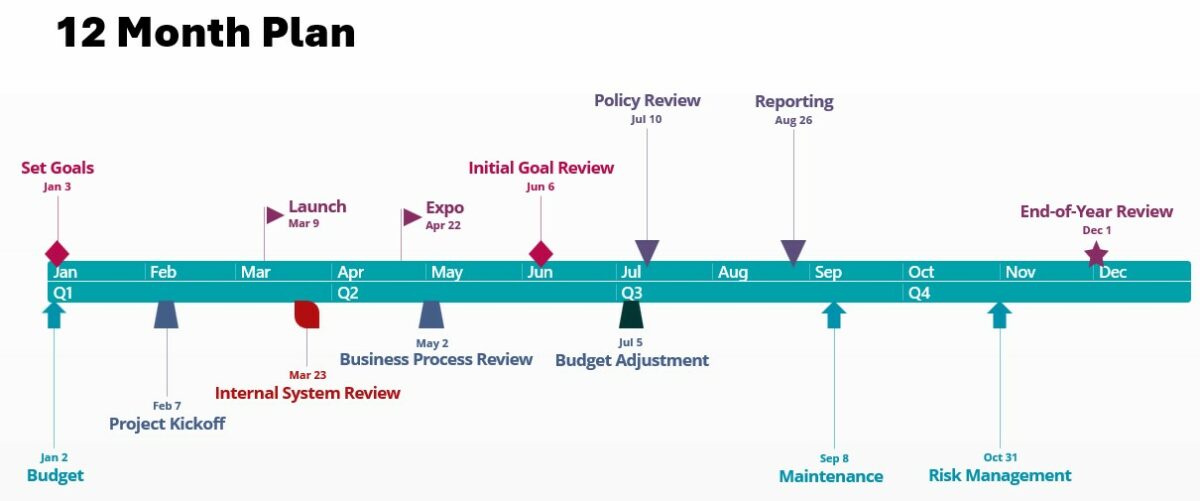
Here’s what you’ll find in this 12-month planning PowerPoint template slide:
- A clean, 12-month layout with quarters clearly marked (although you can turn that off if you prefer)
- Simple colour-coded milestone blocks (easy to edit)
- Space for initiative names, status markers, or other info
- Fully editable in PowerPoint – no new software to learn
- Slide-ready design that works for execs, teams or clients
You can update it in minutes, duplicate the slide for different scenarios, or rework it for any audience.
I’ve used it in steering group decks, business cases and for team meetings where we’re planning out training and development, so you can adapt it to whatever you need.
Tip #1
You can add a link to the slide to your detailed project schedule, whether that’s in Microsoft Excel,
How to use the template
It’s easy to create a timeline in PowerPoint. To get started:
- Download the template ? Download now
- If you don’t already have Office Timeline, download the plugin for PowerPoint
- Replace the placeholder milestones with your initiatives
- Group by category (e.g. team, strategic pillar, product line) or stick with one stream of work.
- Add color coding if you want to show ownership or priority.
You can use this timeline for PowerPoint as a starting point for your annual plan presentation, or as a working timeline that evolves over the year.
A project milestone template is more suited to something that’s multi-year or shorter projects, or that only focuses on the big governance, phasing or decision points. You can start with the annual plan and then go into milestones on a separate slide if you think stakeholders want that view as well.
Tip #2
Planning a product launch or change programme? Create a second version of the timeline that focuses just on that stream of work, or shows an event timeline.
Real-world use cases
Here are a few ways I’ve seen this kind of timeline planning template used in PowerPoint:
- A PMO lead summarised project starts, go-lives, and key governance points
- A change manager mapped initiatives and impact by month to avoid internal clashes
- A resource manager used it to highlight periods of peak demand and key holidays
- A startup COO shared their product roadmap in a board pack (all on one slide, a bit messy to be honest)
You can also add performance indicators and monitor progress with the paid version of Office Timeline. That allows you to track performance against the baseline to show slippage on those important annual goals.
Why I recommend it
I’ve used Office Timeline for years, and that’s the software that created this timeline PowerPoint slide template for you.
I like it because it’s:
- Quick to update, no fiddly formatting and you can import data from Excel
- Professional-looking, no clipart or clashing colours and you can customize to your brand colours
- Slide-ready, great for status updates or exec presentations, just pop it into the deck.
- A way to improve your credibility as a project leader.
It’s made with Office Timeline, a PowerPoint plugin that creates timelines and Gantt charts fast. If you’re doing this kind of work regularly, the plugin is worth a look (and there’s a free version to try).
Download the annual planning template
Get your free Annual Planning Timeline Template for PowerPoint
Plan the year, visualise your goals, and make strategy easier to share.
Annual planning doesn’t have to be a headache. With the right template, you can map out your goals, align your team, and walk into planning meetings feeling prepared, not panicked.
If you’re looking for a quick win that helps you look organised and professional, this template is a solid choice. And if you want to go one step further, Office Timeline makes it even easier.
Let me know if you use it – I’d love to see how you customize it for your team!
Featured Software Partners

Lucen Timeline (previously known as Office Timeline)
Create impressive timelines in just a few clicks with this plugin for PowerPoint. Try it free to create beautiful timelines and Gantt charts right in PowerPoint. Perfect for your next stakeholder presentation!
Get a free trial

Infinity
Task management, forms, workflows and automations, calendars, Kanban boards, Gantt charts and schedules — perfect for managing lists, allocating work to team members, keeping track of your To Dos, and organizing your work. It’s what we use here are RebelsGuideToPM to keep everything organized!
Try it now
